Camera-based inventory verification

Your WMS says where it should be.
See where it actually is.

Find misplaced pallets, check visible inventory against your records every day, and see the evidence for yourself. All with fixed cameras and QR labels.

More than 80 warehouses have successfully used our system to verify pallet locations.

Keep your WMSNo mobile robotsNo RFID hardware
Inventory observationActual warehouse camera image
Real pallet QR recognitionGreen outlines show detected labels.
8MPHigh-resolution PTZ cameras
~24Pallet locations per camera
DailyAutomated visual verification
Try the workflow

System says B-04-03.
Camera says C-06-02.

What would normally take a walk through the warehouse can begin with a simple SKU search. See where the pallet was observed and review the visual evidence.

Daily verification with photographic evidence
Online Report Demo, Excel Export and Email Alerts
Spot missing stock before you need to ship it.
Inventory lookupSample data
WMS EXPECTED LOCATIONB-04-03
CAMERA OBSERVATIONC-06-02
Location mismatch · pallet observed in another rack
Simple by design

Three steps. No moving machines.

Start with a few rack locations and expand as your team sees the value.

01 / INSTALL
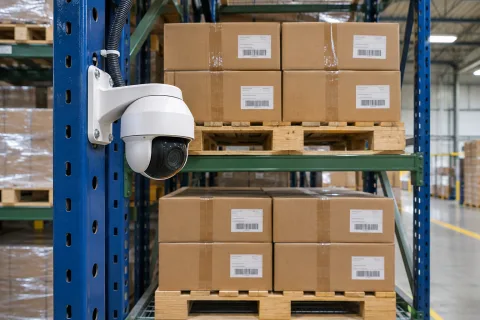
PoE camera and PoE switch connected by a single Ethernet cable.

Mount and connect cameras

One Ethernet cable delivers power and network data. No battery charging or separate AC outlet at each camera. Use a compatible PoE switch or injector.

Cables can travel through beams and columns of the rack. Each camera can also be protected by steel wire cage.
02 / IDENTIFY
QR ID

Label and map each rack

Put a readable QR label on each pallet, facing a camera. Map the visible rack positions in the software so each observation has a known location.

We suggest QR code printed on A4 sized paper/ sticker.

03 / VERIFY
Daily exceptionsA1028B2067C3024MisplacedVerifiedReview

Compare with your records

Verify visible inventory daily, flag location mismatches and review the captured images. Focus manual checks on the exceptions.

  • Spend less on labor and spend less time searching for inventory.
  • Accelerate inventory turnover through better visibility.
Actual installation

Mounted directly on the rack.

Compact 8MP pan-tilt-zoom (PTZ) cameras connect through PoE. One Ethernet cable carries low-voltage 48 V power and data, without a separate power outlet at each camera.

Free integration setup

Keep your existing WMS or ERP.

We connect your inventory records to camera observations. No system replacement required.

  • Cin7 Core
  • inFlow
  • Extensiv
  • Fishbowl
  • ShipHero
  • Odoo
  • NetSuite
  • Shopify
  • QuickBooks
  • CSV / Excel

Other conventional WMS / ERP with an accessible API? We can help connect it, too.

Free setup subject to available API access and inventory fields. Third-party API charges may apply.

A simpler alternative

Fixed cameras make sense when pallets have visible labels and you have a busy warehouse where inventory data quickly becomes outdated.

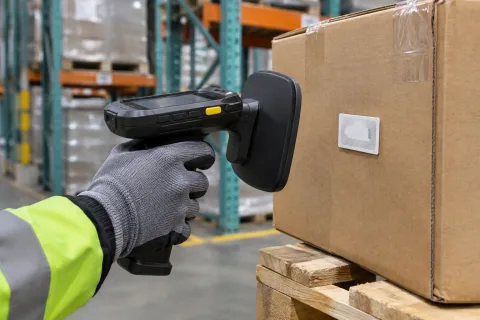
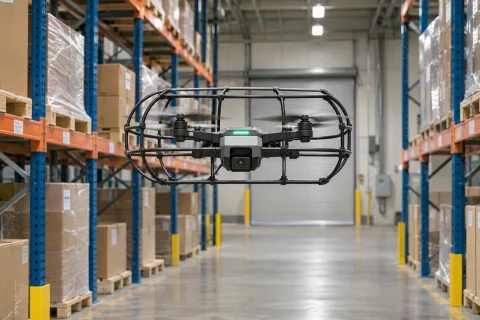
ApproachFixed camera on a pallet rack facing labeled cartonsRackVerifyInventory drone scanning a warehouse aisleDrone / mobile robotHandheld RFID reader aimed at a tagged cartonRFIDWarehouse worker counting cartons with a clipboardManual counting
How it observesRack-mounted pan-tilt-zoom (PTZ) camerasScans inventory while moving through the warehouseAn operator uses a scanner to read radio tagsStaff visit each location
Key benefitLow cost, low maintenance, and real-time visual confirmation of what’s on the rackFlexible scan routesCan count tagged boxes even when they’re out of sightCan verify exact quantities when stock is accessible
Key trade-offRequires installing and connecting multiple camerasHigh cost and maintenance needs. Autonomous movement can pose safety risks.A wide read range can make precise locations hard to pinpoint. RFID provides no visual evidence.Labor-intensive, hard to repeat frequently, and prone to human error.

General architecture comparison; capabilities and costs vary by vendor and deployment. RackVerify is designed for visible pallet-level verification, not exact counts inside closed cartons.

Additional camera features

See more than inventory locations.

Optional AI add-ons. These features incur additional AI token usage charges and are not included in the base monthly software fee.

Visible fire warnings

Flag visible signs of smoke or flames so your team can review the image and investigate a potential fire incident.

Leaning-stack detection

Flag visibly tilted pallet loads or uneven stacks for inspection. See the image and decide where your team should check next.

AI box-count estimates

Vision-language AI estimates how many boxes are visible. Review the estimate alongside the image when planning a closer count.

Start small. Scale simply.

Two cameras to try.
Clear pricing as you grow.

Start with the $99 kit. Your first month of software is free, then one simple monthly software rate supports up to 40 connected cameras. Hardware is purchased separately.

Ongoing software

Software subscription

$20 / month

For up to 40 connected cameras. Camera hardware purchased separately at $49 each. First month of software free.

More than 40 cameras?
$0.50 per additional camera / month
  • Software access for up to 40 connected cameras
  • Visual inventory lookup and daily verification
  • Exception review with captured images
  • 30-day rolling photo history included
  • Free ERP / WMS integration setup

Private hosting and one-time setup options are also available.

Plan your warehouse

Estimate your cameras.
See your costs.

Enter your rack layout for estimated camera and PoE switch costs, plus monthly software pricing. Start with a small area, then expand.

Your rack layout

Live estimate

One section means one visible rack bay or face. Count the two faces of back-to-back racks separately.

Try a layout:
Count individual bays, rather than an entire long row as one section.
Vertical layers. Include floor storage if monitored.
Side-by-side pallet positions on each level.
One rack section

One camera covers up to 6 side-by-side pallet positions and 4 levels.

How this estimate is calculated

Total pallet columns = rack sections × positions across each section.

Total cameras = round up (total pallet columns ÷ 6) × round up (levels ÷ 4).

The estimate groups adjacent, aligned rack sections on the same side of an aisle.

Camera hardware ≈ total cameras × $49.

PoE switches = round up (total cameras ÷ 20), at $60 per switch.

One-time hardware = camera hardware + PoE switch cost.

Monthly software = $20 + $0.50 for each camera beyond the first 40. The first month is free.

Your estimate

USD

480 pallet locations

Estimated cameras20
Camera hardware$9808MP PoE PTZ camera · $49 each
Estimated PoE switches1$60 · $60 per switch
Total one-time hardware$1,040Cameras + PoE switches
Monthly software$20 / monthAfter your first free month

$20/month software access for up to 40 connected cameras. Hardware is sold separately.

Start with two cameras for $99
Data security & privacy

Photo evidence.
Clear privacy measures.

Review the photos behind your inventory observations, with encrypted transmission, 30 days of included photo history and automatic face blurring.

Encrypted in transit

Inventory photos are encrypted during transmission using HTTPS/TLS, helping protect the data as it travels.

30-day photo history

The latest 30 days of inventory photos are included at no extra storage charge. Older photos are automatically deleted on a rolling basis. Longer retention is available upon request.

Automatic face blurring

Detected faces are automatically blurred in inventory images to help protect the privacy of people who happen to enter the camera's view.

Frequently asked questions

Practical answers.
Before you start.

Power, pricing, real-world label reading and privacy.

How do the cameras get power?

Power over Ethernet (PoE) delivers low-voltage DC power and network data through the same Ethernet cable. No batteries or separate AC outlet at each camera. You will need a compatible PoE switch or injector and suitable network cabling.

What does it cost to try, and how is the monthly fee calculated?

The $99 starter kit includes two 8MP PoE PTZ cameras and the cables and PoE adapters or injectors needed to connect them to a standard router. Together they can cover approximately 48 pallet locations, depending on layout and label visibility. Your first month of software is free. From month 2, $20/month covers software access for up to 40 connected cameras. Hardware is sold separately at $49 per camera; each camera above 40 adds $0.50/month. For example, 60 cameras cost $30/month and 100 cameras cost $50/month. Optional AI features incur additional token usage charges. Private hosting and one-time setup options are available on request. Shipping cost is not included. A standard router with an internet connection is required.

Can you connect to my current ERP or WMS?

Yes. We help connect Cin7 Core, inFlow, Extensiv, Fishbowl, ShipHero, Odoo, NetSuite, Shopify and QuickBooks. We also support CSV / Excel imports and can help connect other conventional WMS / ERP systems with an accessible API. Integration setup is free. We confirm your product edition, API permissions and available inventory fields during setup; any third-party API charges are set by your provider.

Can you detect multiple QR codes in one rack location?

Yes. You can enable mixed-SKU storage for a location, and the system can detect multiple visible QR codes within that rack slot. Each code must be readable and linked to the relevant inventory. This identifies the visible labels; it does not independently verify the contents of sealed boxes.

Can you read a QR code that is not directly facing the camera?

Yes, a visible QR code does not have to face the camera perfectly. We use multiple decoding and image-correction methods to improve recognition when labels appear at an angle or are distorted. Extreme angles, glare, blur or insufficient image detail can still prevent a read. Front-facing labels give the most reliable results.

What if a QR code is temporarily blocked?

The system watches for an unobstructed view and captures a usable reading when the label becomes visible. This helps it use clear moments between passing people, forklifts or other temporary obstructions. The view needs to be clear long enough for a readable image. Until a fresh reading is available, a blocked or unreadable label is not proof of missing inventory.

How do you protect the privacy of people in the camera view?

Detected faces are automatically blurred in inventory images to help protect personal privacy. Detection can be affected by distance, lighting and partial obstruction, so camera placement and masking performance should be checked during setup.

How long do you keep the photos, and how are they protected?

Thirty days of inventory photo history are included at no extra storage charge. Photos older than 30 days are automatically deleted on a rolling basis. Inventory photos are encrypted in transit using HTTPS/TLS. If you need longer photo retention, tell us your requirements so we can discuss availability and pricing.

Does it count individual items inside sealed boxes?

No. The system reads visible QR labels and verifies observed pallet locations. Optional vision-language AI can estimate visible box counts as well as a human auditor. It cannot independently count hidden boxes or items inside sealed cartons. Use manual counts when precise quantities are required.

What if a label stays hidden or unreadable?

If there is no usable view, the location remains unverified and needs review. Clear line of sight, adequate lighting and readable labels are still required. Review the image, reposition the label or resolve the obstruction as needed.

Can I use my existing security cameras?

We can evaluate your camera model, image resolution, network access and viewing angles. The trial uses our cameras to establish a known configuration. Compatibility with existing cameras is not assumed.

How much installation is needed?

Mount the cameras, connect them to a suitable PoE network, place visible QR labels. Camera placement and label size depend on rack dimensions and viewing distance. We recommend testing one aisle before planning a larger deployment.

Do I still need physical inventory counts?

Yes, when exact quantities, concealed goods or accounting requirements demand them. Daily visual verification helps detect discrepancies sooner and prioritize manual checks; it does not replace every physical inventory count.

See it in your own warehouse

Start small.
See the difference.

Two cameras. Approximately 48 pallet locations total. Test your actual inventory for $99 before deciding whether to expand.

First software month freeFree integration setupKeep your existing WMS

Tell us about your warehouse

Online Report